Teletutors Developer Guide
Acknowledgements
- Code Generated by AI
AttendanceWindow's logic to handle new and existing student listeners was assisted by ChatGPT, with minor tweaks and adjustments to fit the desired functionality.
Setting up, getting started
Refer to the guide Setting up and getting started.
Design
Architecture
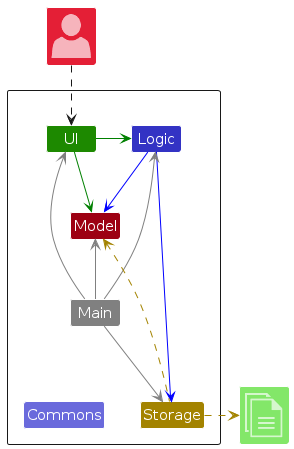
The Architecture Diagram given above explains the high-level design of the App.
Given below is a quick overview of main components and how they interact with each other.
Main components of the architecture
Main (consisting of classes Main and MainApp) is in charge of the app launch and shut down.
- At app launch, it initializes the other components in the correct sequence, and connects them up with each other.
- At shut down, it shuts down the other components and invokes cleanup methods where necessary.
The bulk of the app's work is done by the following four components:
UI: The UI of the App.Logic: The command executor.Model: Holds the data of the App in memory.Storage: Reads data from, and writes data to, the hard disk.
Commons represents a collection of classes used by multiple other components.
How the architecture components interact with each other
The Sequence Diagram below shows how the components interact with each other for the scenario where the user issues the command deletes n/John Doe.
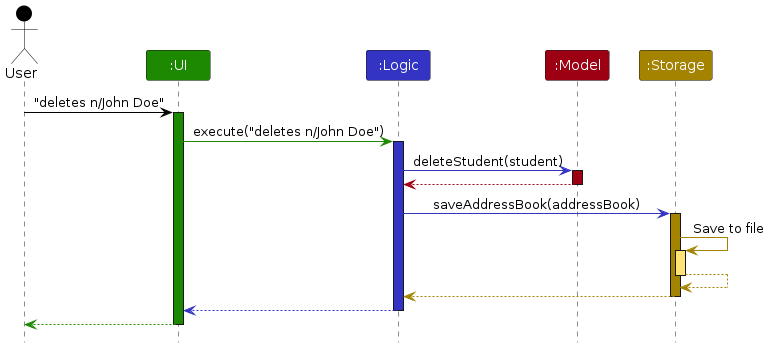
Each of the four main components (also shown in the diagram above),
- defines its API in an
interfacewith the same name as the Component. - implements its functionality using a concrete
{Component Name}Managerclass (which follows the corresponding APIinterfacementioned in the previous point.
For example, the Logic component defines its API in the Logic.java interface and implements its functionality using the LogicManager.java class, which follows the Logic interface. Other components interact with a given component through its interface rather than the concrete class (reason: to prevent outside component's being coupled to the implementation of a component), as illustrated in the (partial) class diagram below.
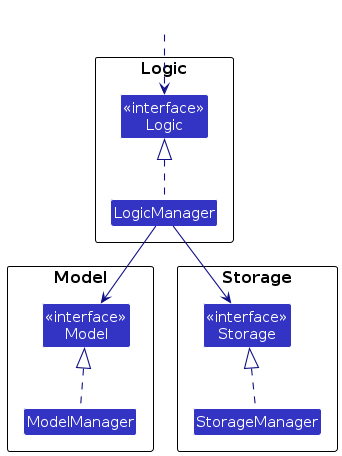
The sections below give more details of each component.
UI component
The API of this component is specified in Ui.java.
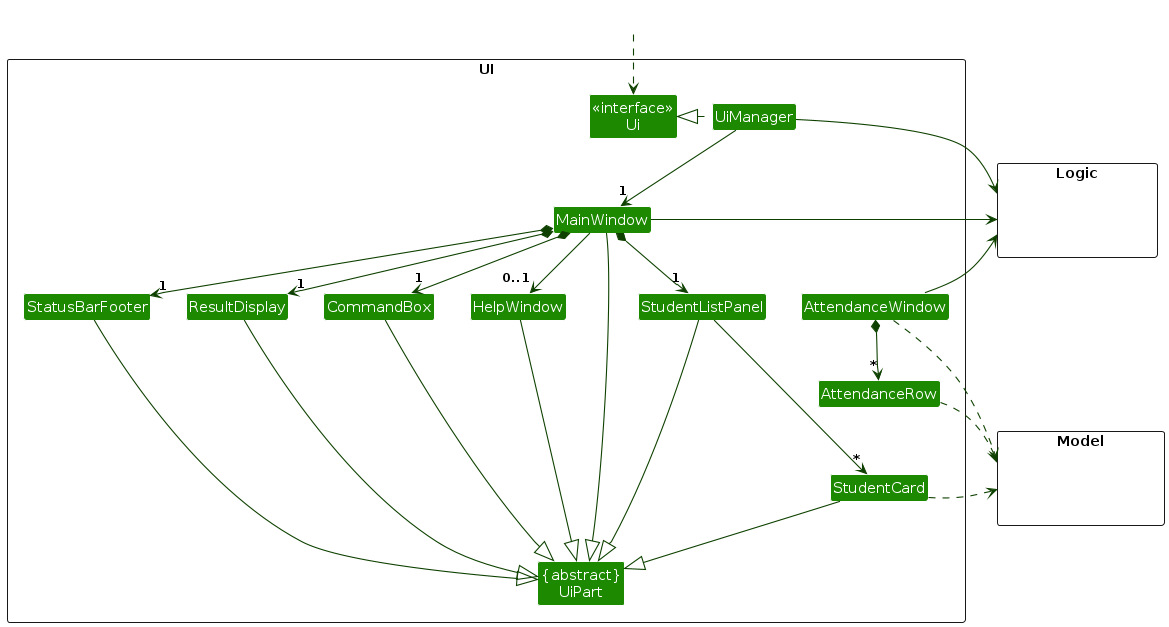
The UI consists of a MainWindow that is made up of parts e.g.CommandBox, ResultDisplay, StudentListPanel, StatusBarFooter etc. All these, including the MainWindow, inherit from the abstract UiPart class which captures the commonalities between classes that represent parts of the visible GUI.
AttendanceWindow and AttendanceRow are separate classes from the main UI, which are used to display the attendance of students in a class.
The UI component uses the JavaFx UI framework. The layout of these UI parts is defined in matching .fxml files that are in the src/main/resources/view folder. For example, the layout of the MainWindow is specified in MainWindow.fxml.
The UI component,
- executes user commands using the
Logiccomponent. - listens for changes to
Modeldata so that the UI can be updated with the modified data. - keeps a reference to the
Logiccomponent, because theUIrelies on theLogicto execute commands. - depends on some classes in the
Modelcomponent, as it displaysStudentobject residing in theModel.
AttendanceWindow Class
The AttendanceWindow Class represents a window displaying the attendance records of students in a specific tutorial group. It,
- depends on the
Logiccomponent, as they need to execute commands to update the attendance. - depends on the
Modelcomponent, as they need to access theStudentobjects to display the attendance. - listens for changes to the
Modeldata so that the table view can be refreshed and updated with the modified data.
AttendanceRow Class
The AttendanceRow class represents a single row in the attendance table, displaying a student's name and attendance status for each date. It,
- depends on the
Modelcomponent, as they need to access theStudentobjects to display the attendance. - listens for changes to the
Modeldata so that the row can be refreshed and updated with the modified data.
Each AttendanceRow is updated in real-time as the underlying attendance records are modified, allowing the UI to maintain up-to-date attendance statuses for each student.
Logic component
API : Logic.java
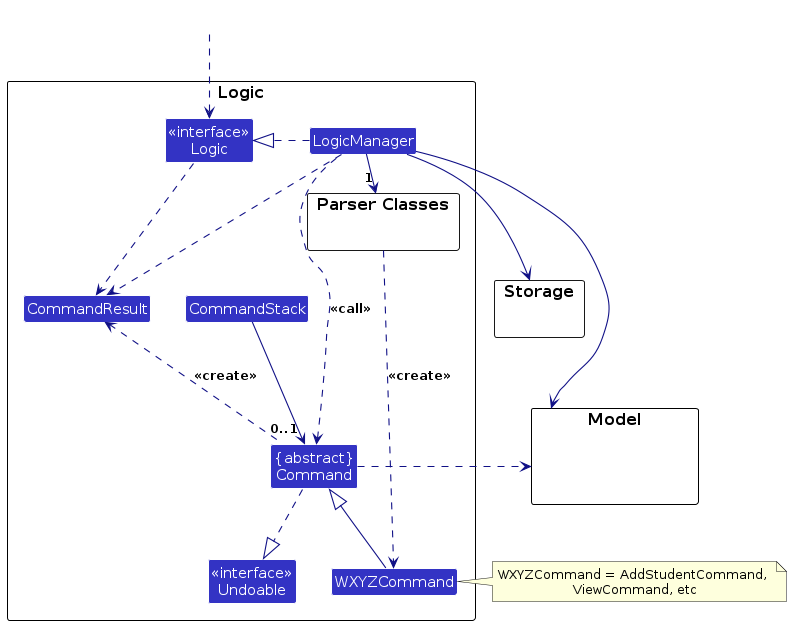
Here's a (partial) class diagram of the Logic component:
The sequence diagram below illustrates the interactions within the Logic component, taking execute("view Diddy") API call as an example.
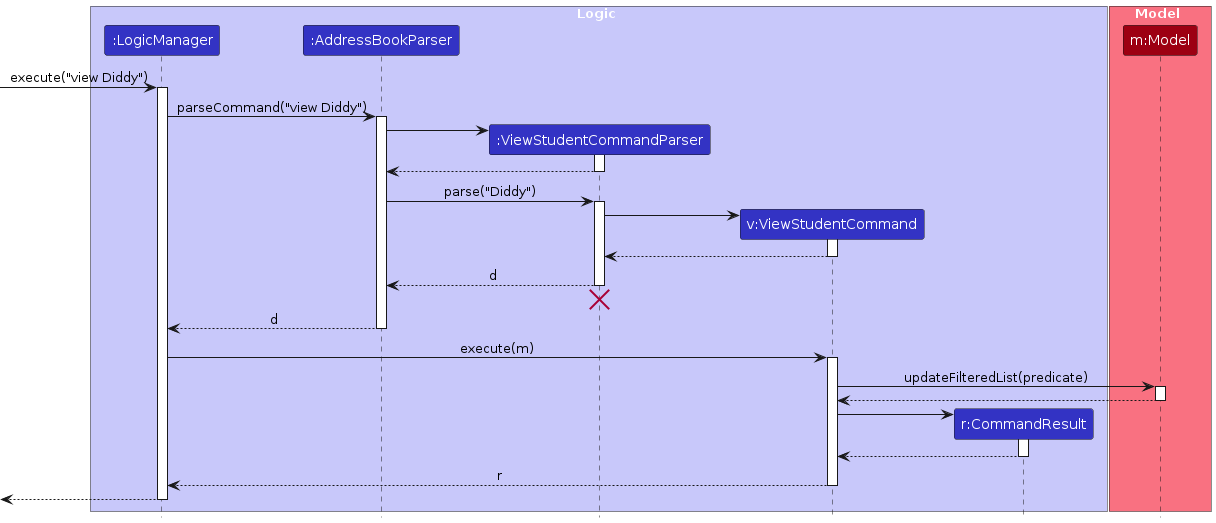
Note: The lifeline for ViewStudentCommandParser should end at the destroy marker (X,) but due to a limitation of PlantUML, the lifeline continues until the end of the diagram.
How the Logic component works:
- When
Logicis called upon to execute a command, it is passed to anAddressBookParserobject which in turn creates a parser that matches the command (e.g.,DeleteCommandParser) and uses it to parse the command. - This results in a
Commandobject (more precisely, an object of one of its subclasses e.g.,DeleteCommand) which is executed by theLogicManager. - The command can communicate with the
Modelwhen it is executed (e.g. to delete a student).
Note that although this is shown as a single step in the diagram above (for simplicity), in the code it can take several interactions (between the command object and theModel) to achieve. - The result of the command execution is encapsulated as a
CommandResultobject which is returned back fromLogic.
Here are the other classes in Logic (omitted from the class diagram above) that are used for parsing a user command:
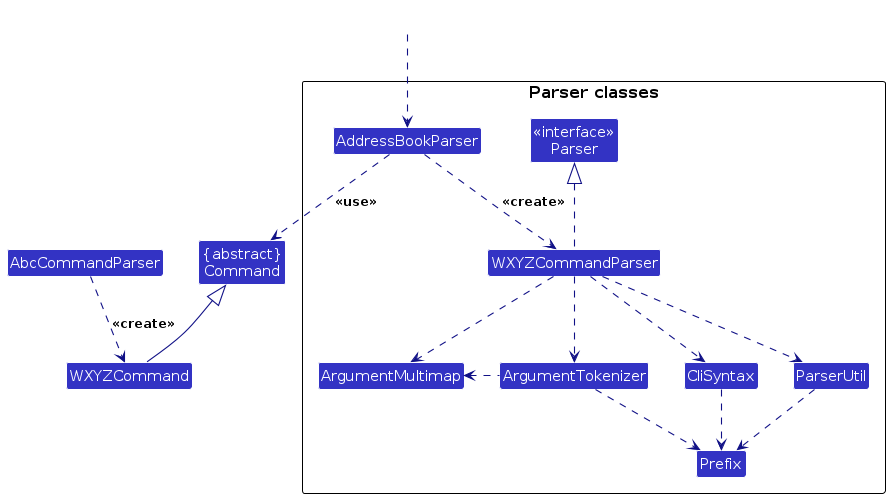
How the parsing works:
- When called upon to parse a user command, the
AddressBookParserclass creates anWXYZCommandParser(WXYZis a placeholder for the specific command name e.g.,AddCommandParser) which uses the other classes shown above to parse the user command and create aWXYZCommandobject (e.g.,AddCommand) which theAddressBookParserreturns back as aCommandobject. - All
WXYZCommandParserclasses (e.g.,AddCommandParser,DeleteCommandParser, ...) inherit from theParserinterface so that they can be treated similarly where possible, e.g during testing.
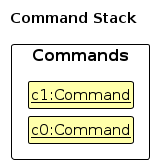
How the undo works:
- When any command that is not undo is called, the
LogicMangerpushes the command onto theCommandStack.
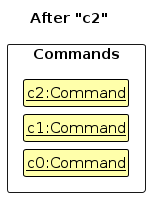
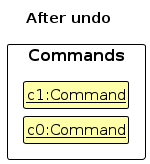
- When the
undocommand is called, theLogicManagerpops the latest command.
Model component
API : Model.java
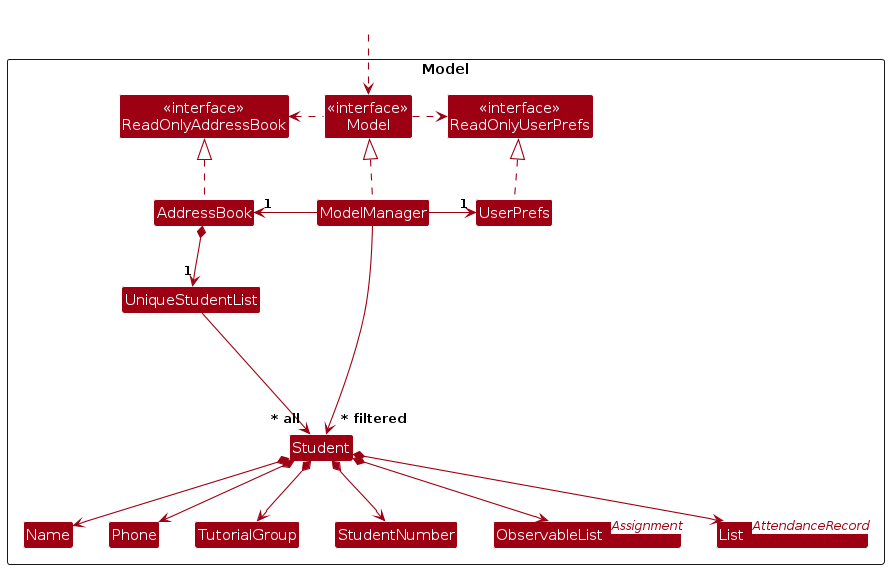
The Model component,
- stores the address book data i.e., all
Studentobjects (which are contained in aUniqueStudentListobject). - stores the currently 'selected'
Studentobjects (e.g., results of a search query) as a separate filtered list which is exposed to outsiders as an unmodifiableObservableList<Student>that can be 'observed' e.g. the UI can be bound to this list so that the UI automatically updates when the data in the list changes. - stores a
UserPrefobject that represents the user’s preferences. This is exposed to the outside as aReadOnlyUserPrefobjects. - does not depend on any of the other three components (as the
Modelrepresents data entities of the domain, they should make sense on their own without depending on other components).

Storage component
API : Storage.java
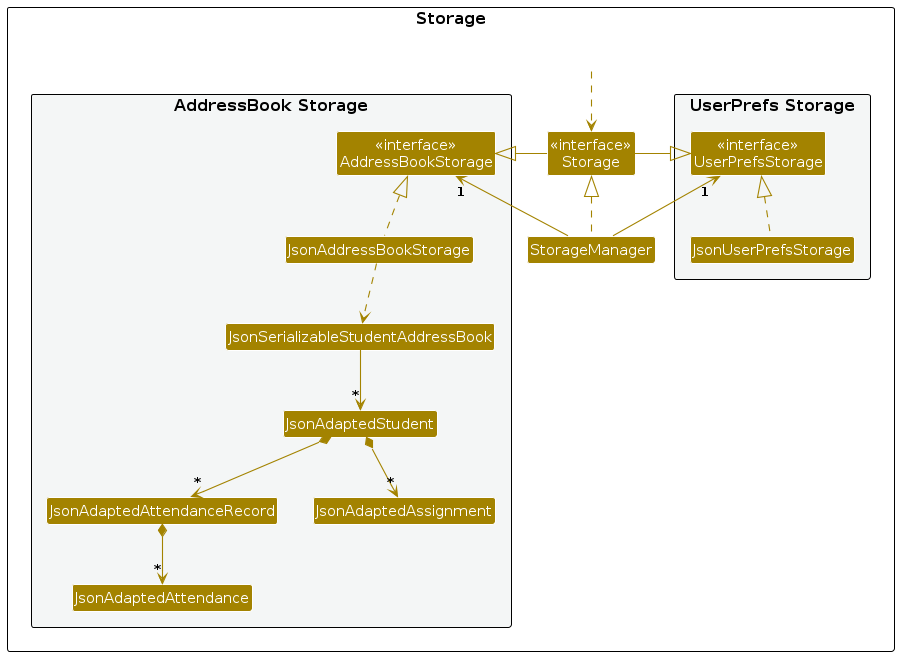
The Storage component,
- can save both address book data and user preference data in JSON format, and read them back into corresponding objects.
- inherits from both
AddressBookStorageandUserPrefStorage, which means it can be treated as either one (if only the functionality of only one is needed). - depends on some classes in the
Modelcomponent (because theStoragecomponent's job is to save/retrieve objects that belong to theModel).
Common classes
Classes used by multiple components are in the seedu.address.commons package.
Planned Enhancements
- View
Studentsby their associative tags (e.gTutorial Group,Assignments) - View
AssignmentDetails - Modify
Gradedetails to be case-insensitive - Modify
ViewCommand's parameters to be case-insensitive - Prevent duplicate
Phonenumbers from being assigned to more than 1Student. - Allow
Namesto include special characters - Find
Studentswho have yet to submitAssignments - Limit the length of inputs to prevent truncation errors
- Add timestamp to
DeadlineforAssignment - Add Start Date and End Date to
Assignment
Documentation, logging, testing, configuration, dev-ops
Appendix: Requirements
Product scope
Target user profile: NUS SOC Teaching Assistants managing students
Value proposition:
- Easier management of administrative tasks (e.g. tracking student attendance, assignments, and grades)
- Increases productivity of users who are more proficient with CLI - interface
- Provides a more organised way to manage student data
- Separate work and personal tasks / messages
User stories
Priorities: High (must have) - * * *, Medium (nice to have) - * *, Low (unlikely to have) - *
| Priority | As … | I want to … | So that … |
|---|---|---|---|
* * * | a tutor who gives homework | easily keep track of my students' assignments | I know whether they have submitted them or not, and whether I need to grade them or remind them to submit work |
* * * | a tutor who wants to keep his personal and work life separate | keep in contact with students and their parents without needing to give them my personal email or number | my privacy is kept intact and my personal information is not shared |
* * * | a tutor who cares about his students' progress | easily keep track of my students' performance in school as well as his participation and learning in tuition | I am better equipped to help my students do well |
* * * | a not so tech-savvy tutor | easily understand the applications' functions and uses, and how to navigate through the application smoothly | I would not have any issues using the app to better organise my tasks and schedule as a tutor |
* * * | a part-time tutor (student) with tight deadlines | take a glance through the app to see exactly what needs my attention | I can instantly filter out the important tasks that I need to do, like marking and preparing for tutorials, so I can shift my focus back to my other deadlines |
* * * | a tutor ready to start using the app | import the data of all my students | I can use the app instantly |
* * * | a first time user | get a list of commands that cover the main features of the app | I can explore and get a feel for the functionalities |
* * * | a tutor who prefers CLI to GUI | use the keyboard for all purposes in the app instead of needing to scroll and click using a mouse | I am comfortable and enjoy using the app |
* * * | a veteran tutor with a set of pre-existing students | synchronize list of contacts into the app | I do not need to manually enter each contact which is a hassle |
* | a tutor | have timely reminders for upcoming deadlines | I can make sure the students submit them on time |
* | a tutor who wants to keep tabs on a student's grades | track the scores of students across several assessments | I can determine which student requires more attention |
* | a full-time tutor | track the hours I've worked each week | I can ensure accurate payment |
* | a tutor who has different classes of students | sort my students by their class | I can find the appropriate information quickly |
* | a tutor | quickly search for tasks or appointments based on keywords | I can find specific tasks or sessions easily |
* | a tutor | set recurring tasks (like weekly lesson planning) | I don't have to manually input them every time |
* | a forgetful tutor | receive notifications when new sessions or tasks are coming up | the task of remembering these timings can be relegated to the app |
* | a 1-1 tutor | keep track of individual student progress and test scores | I can better tailor tuition efforts to improve outcomes |
* | an organised tutor | set task priorities (high, medium, low) | I can focus on the most important tasks first |
* | a tutor | update contact details | students information is up to date |
* * | a detailed tutor | add notes to contact details | I can track important information |
* * | a tutor of a class of students | mark the attendance of students of the class I am currently teaching | I can monitor which students did not attend the class for that week so that I can contact their parents |
* * * | a tutor | add new students manually | new students that join the class midway can be added |
* * | an organised tutor | color-code tasks and appointments based on their type (tutorials, marking, meetings) | I can visually differentiate between various commitments |
* * | a tutor | search students by certain attribute e.g., name | I can access all details about them |
* * * | a longtime tutor | clear the data of my ex students | I can keep my contacts organised |
* * | a tutor with a messy filing system for notes and other additional content | use the app to organise these contents based on the class | it will be more efficient for finding the notes required for that class |
* * | a tutor | be notified when an input task or session overlaps with another commitment | I can avoid scheduling conflicts |
* * | a paranoid tutor | backup my contacts to a local file | I do not accidentally lose all contacts |
* * | a tutor | extend or adjust deadlines if needed | I can manage unexpected delays without losing track |
* | a tutor who would like the option of switching between light and dark themes | switch between the modes in the application | I would get my preferred layout theme |
* * | a data-centric tutor | view a summary of all contacts | I can analyze key information about my students |
* * | a tutor who doesn't use a mouse | use the keyboard shortcuts provided by the application | I can utilize and learn the features efficiently |
* * | a tutor with a long history of students | archive certain contacts | I only keep track of currently active students |
* * | a careless tutor | undo latest command | I can easily update contacts |
* * | a tutor | receive alerts when upcoming tasks and lessons are nearing | I can better stay on schedule |
* | a tech savvy tutor | set up macros to quickly switch between commonly used features | I can customise the application to my preferences and master the features of the application |
Use cases
(For all use cases below, the System is the TeleTutors App and the Actor is the tutor, unless specified otherwise)
Use case: Grading an assignment (for one student)
MSS
Tutor requests to add a new assignment for the specified student upon release of the assignment.
Teletutors App confirms the assignment has been successfully added and displays the newly added assignment.
Upon receiving the assignment, tutor requests to mark the assignment's submission status as submitted.
Teletutors App confirms the assignment has been successfully marked as submitted and displays the assignment as submitted.
Tutor requests to give the assignment a grade.
Teletutors App confirms the assignment has been successfully graded and displays the grade for the assignment.
Use case ends.
Extensions
1a. Specified student does not exist.
- 1a1. Teletutors App informs the tutor that the student cannot be found.
- 1a2. Tutor adds the student if the student has not been added yet or enters the student name again if he misspelled it before.
Use case resumes from step 2.
1b. There are multiple students specified by the same name.
- 1b1. Teletutors App prompts the tutor for a student number to uniquely identify the student.
- 1b2. Tutor enters the student number for the student he wants to add the assignment for.
Use case resumes from step 2.
1c. Tutor enters an invalid deadline for the assignment.
- 1c1. Teletutors App prompts the user to enter a valid deadline.
- 1c2. Tutor re-enters a valid date for the deadline or uses the correct format if he typed it in the wrong format previously.
Use case resumes from step 2.
Use case: Mark attendance for a class that most students attended
MSS
Tutor requests to mark everyone as present for a selected tutorial session.
Teletutors App confirms everyone in that tutorial group has been marked present for that session.
Tutor requests to mark a specific student who did not attend the session as absent.
Teletutors App updates the attendance record and confirms the action. Step 3-4 is repeated for each student who did not show up until they have all been marked absent.
Use case ends.
Extensions
1a. Specified tutorial group does not exist.
- 1a1. Teletutors App informs tutor that the tutorial group cannot be found.
- 1a2. Tutor enters the correct tutorial group if he misspelled it originally, or adds students to that tutorial group if it was empty previously, and reenters the request.
Use case resumes from step 2.
3a. Specified student does not exist.
- 3a1. Teletutors App informs the tutor that the student cannot be found.
- 3a2. Tutor adds the student if the student has not been added yet, or enters the student name again if he misspelled it previously.
Use case resumes from step 4.
3b. There are multiple students specified by the same name.
- 3b1. Teletutors App prompts the tutor for a student number to uniquely identify the student.
- 3b2. Tutor enters the student number for the student he wants to mark absent.
Use case resumes from step 4.
Use case: Add student details
MSS
Tutor requests to add a new student.
Teletutors App prompts for the student's details.
Tutor provides the required student details.
Teletutors App confirms the student has been successfully added.
Use case ends.
Extensions
- 3a. Tutor enters an invalid prefix argument
3a1. Teletutors App displays an error message.
3a2. Tutor re-enters the correct prefix argument.
Use case resumes from Step 4.
Use case: Delete student details
MSS
Tutor requests to delete a student's details.
Teletutors App prompts for the compulsory name field and, optionally, the student number.
Tutor provides the required student's details.
Teletutors App deletes the student and associated records.
Use case ends.
Extensions
3a. The student name does not exist in the system.
3a1. Teletutors App informs the tutor that the student cannot be found.
Use case resumes from Step 3.
3b. There are multiple students that share the same name in the system.
3b1. Teletutors App informs the tutor that there are multiple students with the same name.
Use case resumes from Step 3.
3c. The student number does not exist in the system.
3c1. Teletutors App informs the tutor that the student cannot be found.
Use case resumes from Step 3.
Use case: Add an assignment to a student
MSS
Tutor requests to add an assignment to a student
Teletutors App prompts for the assignment details
Tutor provides the required assignment details
Teletutors App confirms the assignment has been successfully added
Use case ends.
Extensions
3a. Tutor enters an invalid deadline for the assignment.
- 3a1. Teletutors App prompts the user to enter a valid deadline.
- 3a2. Tutor re-enters a valid date for the deadline or uses the correct format if he typed it in the wrong format previously. Use case resumes from step 4.
3b. Tutor enters an invalid grade for the assignment.
- 3b1. Teletutors App prompts the user to enter a valid weightage.
- 3b2. Tutor re-enters a valid weightage for the assignment. Use case resumes from step 4.
Non-Functional Requirements
- Should work on any mainstream OS as long as it has Java
17or above installed. - Should be able to hold up to 1000 persons without a noticeable sluggishness in performance for typical usage.
- A user with above average typing speed for regular English text (i.e. not code, not system admin commands) should be able to accomplish most of the tasks faster using commands than using the mouse.
- Codebase should be modular and easy to update, so that future developers can easily add new features or fix bugs.
- App should have the ability to gracefully handle a data file that is corrupted without crashing, and inform the user of the issue.
- System should gracefully recover from minor errors (e.g., incorrect or incomplete input) by either prompting the user to correct the issue, or using default values where applicable.
- System should have well-written and accessible user and developer documentation to support both end-users and future developers in using and maintaining the application.
- System should have a comprehensive suite of automated tests to ensure that new changes do not break existing functionality.
- System should implement a data retention policy, ensuring that data and records older than a certain period are archived or deleted to optimize performance and comply with legal requirements.
- System should have easy-to-use backup and restore functionality, enabling users to create backups of their data, and restore their data in the event of data loss or corruption.
Glossary
- Mainstream OS: Windows, Linux, Unix, MacOS
- Modular: Codebase is divided into separate parts that can be updated without affecting other parts.
- Gracefully recover: Provides an appropriate solution without crashing the application.
- Data retention policy: Guidelines regarding what data should be kept, how long data should be kept and more.
- CLI - interface: Any application that mainly takes in input via text, not necessarily through a command console.
- Privacy: Personal details that are not meant to be shared with others.
- Automated Tests : Tests that are run automatically to ensure that the application is working as expected.
Appendix: Instructions for Manual Testing
Given below are instructions to test the app manually.
Note: These instructions only provide a starting point for testers to work on; testers are expected to do more exploratory testing.
Launch and shutdown
Initial launch
Download the jar file and copy into an empty folder
Launch the jar using the java -jar command.
Expected: Shows the GUI with no contacts currently. The window size may not be optimum.
Saving window preferences
Resize the window to an optimum size. Move the window to a different location. Close the window.
Re-launch the app by using the java -jar command.
Expected: The most recent window size and location is retained.
Deleting a student
Deleting a student while all students are being shown
Prerequisites: List all students using the
listcommand. The student uniquely namedJohn Doeis in the list, but not the studentJane.Test case:
deletes n/John Doe
Expected:John Doeis deleted from the list. The name and student number of the deleted contact are shown in the status message.Test case:
deletes n/Jane
Expected: No student is deleted. Error details shown in the status message. State of command box remains the same, i.e. the command that was typed in remains in the command box.Other incorrect delete commands to try:
deletes,deletes x/,...(where x is any invalid prefix)
Expected: Similar to previous case.
Marking attendance for a tutorial group
Marking attendance for a mostly-present tutorial group (2 - 3 Students absent)
Prerequisites: The tutorial group
T01is added to a class worth of students. The studentsJohn DoeandJane Doeare in the tutorial group.Test case:
markpresentall tg/T01 dt/2025-01-20→markat n/John Doe dt/2025-01-20 pr/a→markat n/Jane Doe dt/2025-01-20 pr/a→getattg tg/T01
Expected: On the date columnJan 20 2025, all students in the tutorial groupT01are markedpresent, except forJohn DoeandJane Doewho are markedabsent. The status message shows the name of the lastTutorial Group's attendances that were shown.Test Case:
markpresentall tg/T11 dt/2025-01-20
Expected: The tutorial groupT11does not exist. Error message shown in the status message. State of command box remains the same, i.e. the command that was typed in remains in the command box.Other incorrect mark commands to try:
markpresentall,markpresentall x/ x/,markat,markat x/ x/ x/,...(where x is any invalid prefix)
Expected: Similar to previous case.
Marking Attendance for a mostly-absent Tutorial Group (2 - 3 Students present).
Prerequisites: The
Tutorial GroupT02is added to a class' worth of students. The StudentsJohn DoeandJane Doeare in the tutorial group.Test case:
markabsentall tg/T02 dt/2025-01-20→markat n/John Doe dt/2025-01-20 pr/p→markat n/Jane Doe dt/2025-01-20 pr/p→getattg tg/T02
Expected: On the date columnJan 20 2025, all students in the tutorial groupT02are markedabsent, except forJohn DoeandJane Doewho are markedpresent. The status message shows the name of the lastTutorial Group's attendances that were shown.Test case:
markabsentall tg/T11
Expected: The tutorial groupT11does not exist. Error message shown in the status message. State of command box remains the same, i.e. the command that was typed in remains in the command box.Other incorrect mark commands to try:
markabsentall,markabsentall x/ x/,markat,markat x/ x/ x/,...(where x is any invalid prefix)
Expected: Similar to previous case
Appendix: Planned Enhancements
List students by other fields
Currently, users may only list students by name. We plan to expand this to include other relevant fields such as tutorial group and assignments
View assignment details
Currently, users cannot view assignment deadlines. We plan to implement a feature which can allow users to view assignment details.
Input for grade is case-sensitive
Currently, the input for grade is case-sensitive which may be inconvenient for the user. We plan to make the input for grade case-insensitive.
Input for name in view is case-sensitive
Currently, the input for name in view is case-sensitive which may be inconvenient for the user. We plan to make the input for name in view case-insensitive.
Prevent duplicate phone numbers.
Currently, users can input duplicate phone numbers for different students. This is likely to be an error from the user and we plan to prompt the user about this error in the future.
Allow names to include certain special characters.
Currently, names can only contain alphanumeric characters and characters like '/' are not allowed. We plan to allow characters like '/' to allow a wider range of names to be entered.
Sort the displayed list of students
Currently, there is no way to sort the displayed list of students. We plan to add ways for the user to sort the displayed list of students (e.g. sorting by number of ungraded assignment)
Limit the length of inputs
Currently, entering extremely large inputs may cause the UI to truncate the display of these fields. Inputs beyond a reasonable length are likely an error. We plan to limit the length of input to prevent truncation errors.
Increase specificity of deadline
Currently, deadlines do not have a timestamp. We plan to allow deadlines to include a timestamp.
Track submission dates for assignments
Currently, assignment does not track its associated submission date. We plan to allow users to input a relevant submission date.